The 3D Figurine Photo Trend: Turn Yourself Into a Collectible
Of all the AI photo trends that blew up over the past year, the figurine one might be the most fun: you upload a selfie and get back a photo of yourself as a boxed collectible figure — tiny plastic you, standing on a display base, next to retail-style packaging with your “character art” printed on the box.
It works because the output isn’t trying to be a realistic photo of you. It’s a photo of an object that looks like you, which is somehow more charming. Here’s how to nail it, and the mistakes that flatten most people’s first attempts.
How the Trend Works
The prompt asks Gemini (Nano Banana) to do three jobs at once: model you as a stylized figure, design the packaging, and photograph the whole thing like a product shot on a desk or shelf. Good versions sell the physicality — visible plastic sheen, seam lines, a blister pack or windowed box, shallow depth of field like a real product photo.
The trend took off in 2025 with the “boxed action figure” format and splintered into variants: chibi figures, anime-style scale figures, blind-box toys, even figures shown next to a computer screen displaying the “3D modeling software” they were designed in.
The Base Prompt
Upload a clear photo of yourself — full body works best, but a good half-body shot is fine — and use:
Create a photorealistic product photo of a 1/7 scale collectible figurine
of me, based on this photo. The figure stands on a round transparent base
on a wooden desk. Next to it, a retail toy box with a window, featuring
character artwork of me and stylized packaging design. Realistic plastic
material with subtle sheen, studio product lighting, shallow depth of
field. Keep my exact facial features, hairstyle, and outfit on the
figurine, do not change my face.
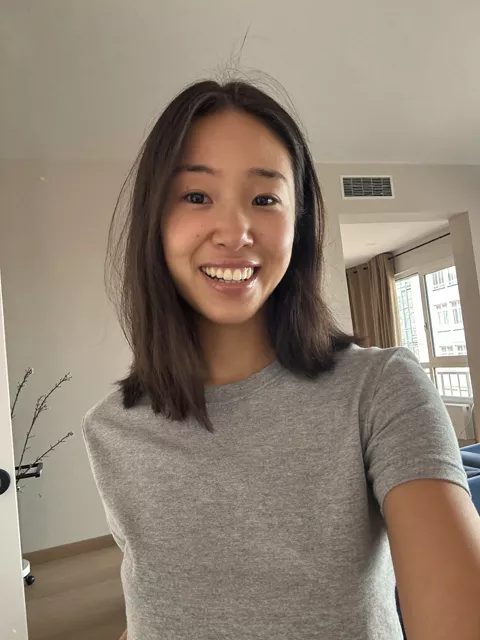
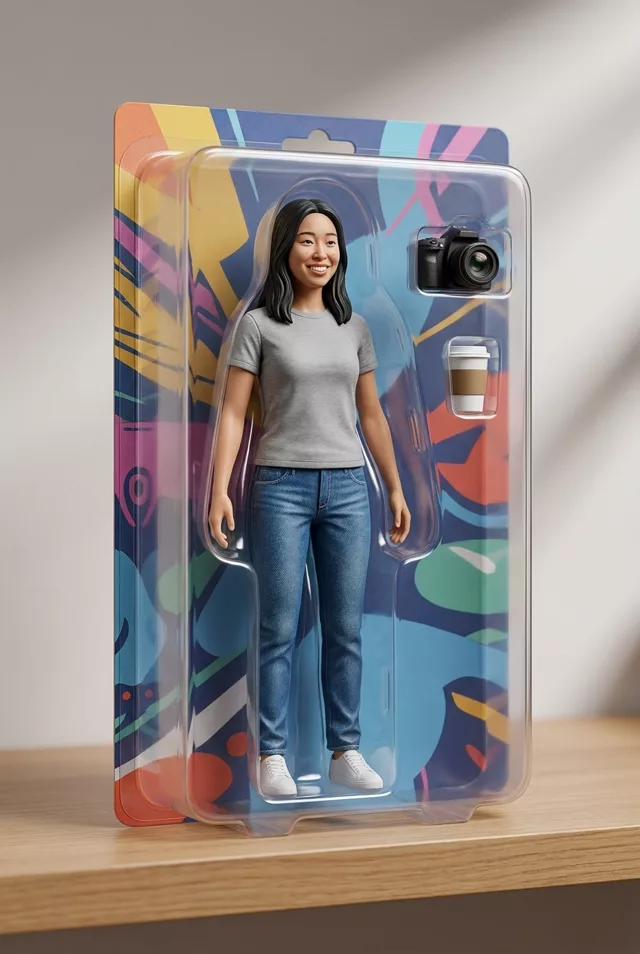
The identity clause still matters even though the output is a toy — without it, you get a generic figure that vaguely gestures at your haircut.
Variations Worth Trying
Chibi style. Add “in cute chibi style with an oversized head and small body” and drop the scale reference. Chibi is forgiving: it exaggerates features rather than replacing them, so it often feels more like you than the realistic version.
Blind box. “A small blind-box style figure of me next to its collectible packaging” gives you the rounded, minimal toy look.
Desk scene. Add “on a cluttered designer’s desk with a monitor in the background showing the 3D sculpt of the figure” for the behind-the-scenes variant that did numbers on social media.
Your hobby as the theme. Give the figure your actual accessories — a guitar, a camera, running gear — and the packaging a matching theme. This is what makes people say “okay, that’s actually me.”
Common Mistakes (and Fixes)
The figure doesn’t look like you. Usual causes: source photo too small or face partly hidden, or too many style words. Use a sharper photo and keep the identity line. Chibi variants need the clause too — “keep my recognizable features and hairstyle.”
It looks like a photo of a person, not a toy. The model skipped the miniaturization. Reinforce the object-ness: “visible plastic texture, toy-like proportions, the figure is small, about 15 cm tall, on a desk.”
The box text is gibberish. AI text rendering has improved but still garbles long words. Ask for “minimal text on the packaging” or specify one short word you actually want, like a nickname. Don’t put a brand’s logo on the box — inventing fake branded merch of yourself is a quick way into trademark trouble.
Everything is too perfect. Real product photos have context. “On a shelf with other blurred collectibles in the background” adds the depth that makes it convincing.
A note on people other than you: making a figurine of a friend needs their okay first, same as any AI edit. And when you post yours, mention it’s AI — half the fun of this trend is people knowing the toy doesn’t exist.
The Mini-Me Twist
The newest branch of this trend flips the format: instead of turning into a figurine, you stay exactly as you are — and a knee-high chibi version of you joins the photo. Same hairstyle, same outfit in miniature, standing beside you or copying your pose, while you and the background stay photorealistic and untouched.
Edit this photo: add a small chibi-style mini-me version of myself right
next to me — a cute cartoon character about knee height, with my exact
hairstyle, hair color and the same outfit in miniature, rendered in a soft
3D-animation style with big expressive eyes. The mini-me copies my pose or
interacts naturally with me. Keep me, my pose and the entire background
completely unchanged and photorealistic — only the mini-me is added,
matched to the photo's lighting and shadows so it sits naturally in the
scene. Keep my exact facial features, do not change my face.
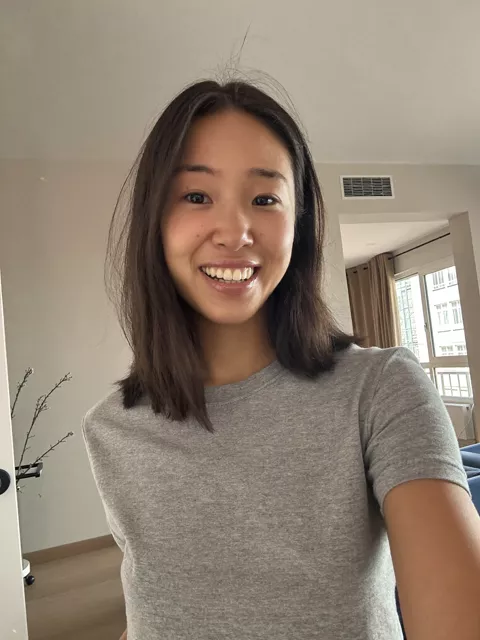
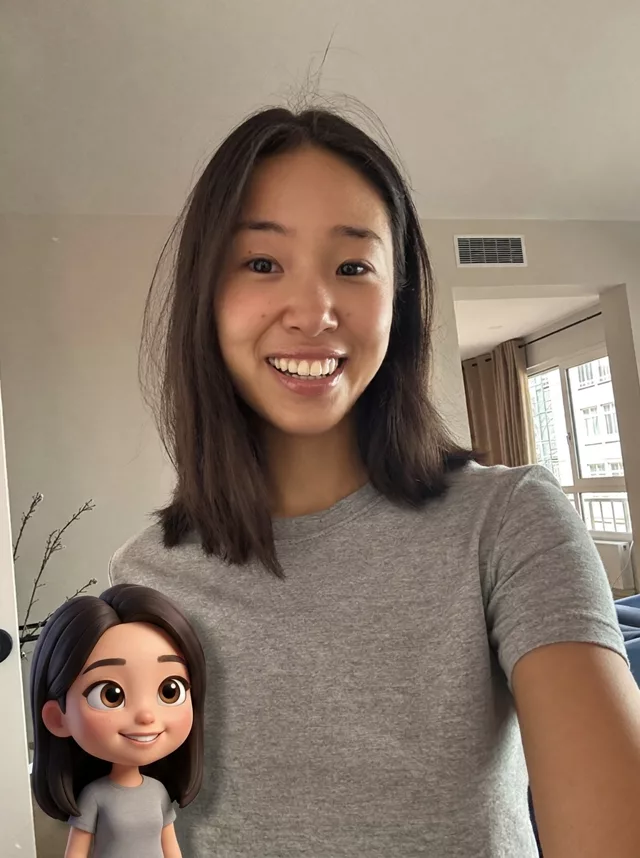
The “keep me and the background unchanged” framing is what separates this from the boxed-figurine prompts above — the photo stays a photo, and only one small guest is invited in. It’s saved in the library as My Mini-Me.
Level It Up
Once you have a figurine image you love, you can run it through an image-to-video model with a slow orbit prompt (“camera slowly rotates around the figurine, product showcase style”) for a turntable video. Our prompt library has the full set of figurine variants, and the prompt generator can combine the figure style, packaging type, and scene into one prompt for you.
FAQ
Can I actually 3D-print the result? Not directly — the output is a 2D image, not a 3D model. Some tools can generate a mesh from an image, but expect hobby-grade results, not the crisp figure in your picture.
Why does my figurine have weird hands or feet? Small extremities on a small figure are hard for image models. Regenerate first; if it persists, simplify the pose to “standing, arms at sides.”
Which photo works best as input? A full-body photo, front-facing, in an outfit with clear shapes and colors. Busy patterns and dark, low-contrast clothing translate poorly to tiny plastic.