The AI Changed My Clothes — How to Lock Wardrobe and Color
You asked for warmer light. The photo came back with you in a dress you have never owned. The face is right, the mood is right, and the shirt you were actually wearing is gone.
This is one of the easier problems to fix once you understand what is causing it, because unlike a drifting face, clothing responds well to being named.
Why It Happens
An edit is a regeneration. The model is not painting a filter over your photo — it is rebuilding the image, and your shirt is part of the image. If nothing in the prompt says what you are wearing, the shirt is one of the things it gets to decide.
What it decides with is the rest of your prompt. Ask for a beach vacation and it will dress you for a beach. Ask for a 1990s mall portrait and it will reach for a turtleneck. The wardrobe is being inferred from the scene, which is reasonable behaviour and completely wrong when you wanted your own clothes.
It Goes Wrong in Both Directions
Here are two of our own results. Both started from the same source photo — a plain grey t-shirt — and neither prompt says a single word about clothing.
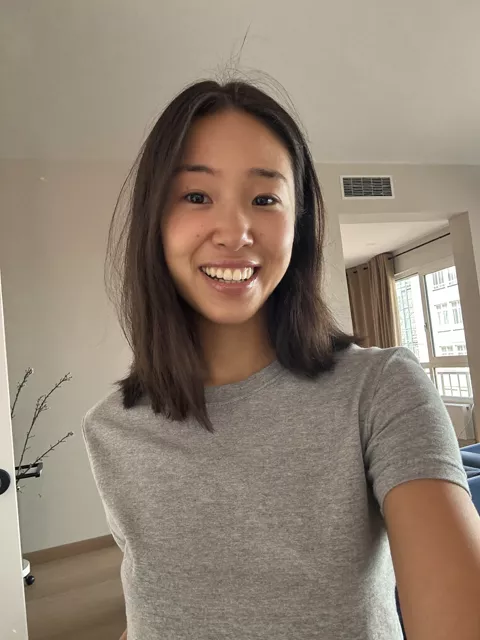
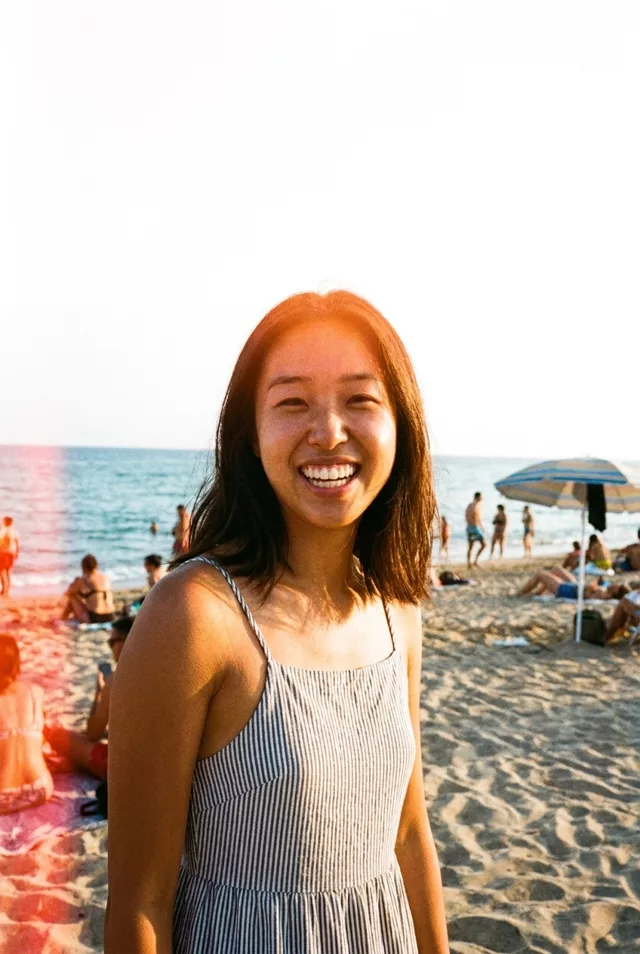
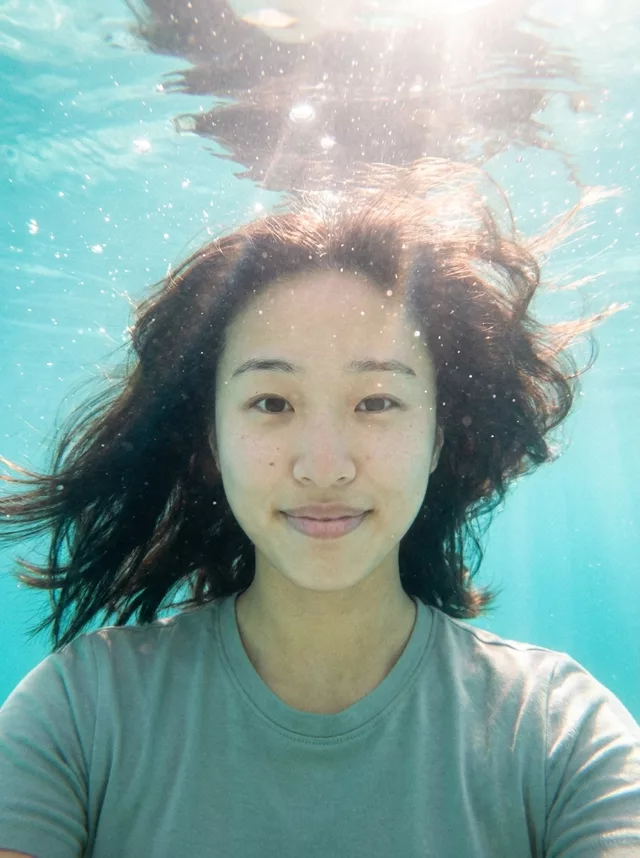
The lesson is not “it always changes your clothes” or “it never does”. It is that an unmentioned wardrobe is unmanaged, and you get whichever way the model leans that run.
Fix 1: Say What You Are Wearing
The single most effective change, and the one people skip because it feels redundant. Describe the garment the way you would to someone who cannot see the photo:
Keep my clothing exactly as it is in the original photo: a plain
grey short-sleeved crew-neck t-shirt, no pattern, no logo.
Do not change my outfit.
Three things make that work. It names the item, it names the colour, and it bans the things models like to add — patterns and logos appear out of nowhere with remarkable consistency.
Fix 2: Use Colour Words That Do Not Drift
“Grey” is safe. “Neutral”, “muted”, “earthy” and “natural” are not — they are mood words, and the model reads them as permission to reinterpret. The same goes for “light blue”, which drifts toward white, and “burgundy”, which drifts toward red.
If a colour matters, anchor it with a second concrete word: “mid-grey, the colour of wet concrete” survives better than “grey” alone. This is the same trick that works for skin tone in our guide to AI edits lightening your skin.
Fix 3: Watch the Words That Imply an Occasion
Some phrases carry a dress code with them whether you meant one or not. “Beach vacation”, “formal event”, “cosy autumn”, “date night”, “studio portrait” and “professional” all come with an implied outfit.
If you want the scene without the costume, split the two apart explicitly:
Change only the background and the lighting to a summer beach at
golden hour. Keep my clothing, hair and face exactly as they are
in the original photo.
Naming what should change is more reliable than listing what should not.
Fix 4: Keep the Wardrobe Clause Separate From the Identity Clause
“Keep my exact facial features” protects your face. It does not protect your shirt, and people assume it covers everything below the neck. It does not — the two need their own sentences, the same way skin tone does.
Put them next to each other so neither gets lost:
Keep my exact facial features, do not change my face.
Keep my exact clothing, do not change my outfit.
Fix 5: Fix It in a Second Pass
If the scene came back perfect and only the outfit is wrong, do not start over. Feed the result back in:
This image is correct except for the clothing. Replace the outfit
with the one from the attached original photo — a plain grey
short-sleeved t-shirt. Change nothing else about the image.
Attach the original alongside it if your tool takes two images. Clothing repairs in a second pass work much better than face repairs, because you are asking for a garment rather than a specific person.
Fix 6: Check the Small Things Before You Post
Even when the outfit survives, the details often do not. Look at the neckline shape, the sleeve length, the button count and which side they are on, any print or text, and whether a jacket that was open is now closed. Text on clothing is the least likely thing to survive intact — a logo almost always comes back as invented lettering.
Where This Bites Hardest
Prompts that name an outfit are doing half this work for you already. In our own prompt library, 25 of the 57 transform prompts specify what you should be wearing — a tweed blazer, a denim jacket, coordinated linen — and those are the predictable ones. The other 32 say nothing about clothing, which means the scene decides.
If you are building something in the prompt generator, the same applies: it assembles style, mood and extras, and unless you add a wardrobe line yourself, the style you picked will choose for you.
FAQ
Can I ask it to keep my clothes without describing them?
You can, and “keep my exact clothing from the original photo” helps on its own. But describing the garment as well roughly doubles how often it holds, because the description gives the model something to reconstruct from rather than a rule to remember.
It changed my clothes and I actually like the new outfit. Is that a problem?
Only if you are posting it as a photo of yourself in something you own. It is worth knowing that the edit is now further from reality than you may have intended — and, as with any AI edit, worth labelling as AI when you share it.
Why does it keep adding a logo or text to my shirt?
Because plain fabric is unusual in the photos these models learned from, and a blank chest reads as an unfinished area to fill. Ban it directly — “plain fabric, no logo, no text, no pattern” — rather than hoping it does not come up.