Pet Edits Drift: Wrong Markings, Wrong Eye Color — How to Hold Them
The edit came back beautiful and it is not quite your cat. The white bib is broader than it should be, the blaze runs further up the face, and the eyes are a confident green they have never been.
Nobody else will notice. You will, immediately, because you know that face better than you know most human ones.
Why Pets Drift Harder Than People Do
Human faces have a fixed layout — two eyes above a nose above a mouth — and models have learned that structure deeply. Get a human face slightly wrong and you still get a face.
A pet’s identity is not structure. It is an arbitrary pattern: this white patch, this shape, this shade of amber. The model can only copy what it can see, and when it cannot see enough it falls back on what that kind of animal usually looks like. A tuxedo cat becomes a generic tuxedo cat; a tabby gets tidier, more symmetrical stripes than any real tabby has.
That fallback explains why the drift always goes the same direction: toward the breed average.
The Clause Alone Is Not Enough
Here is one of our own prompts that already carries a preservation clause — “Keep my pet’s exact fur colors, markings and face completely unchanged” — and an instruction not to touch the scene at all. It only asks for a light and colour change.
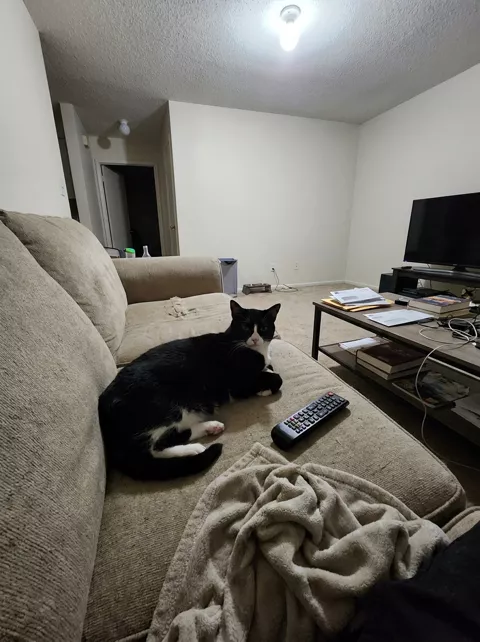
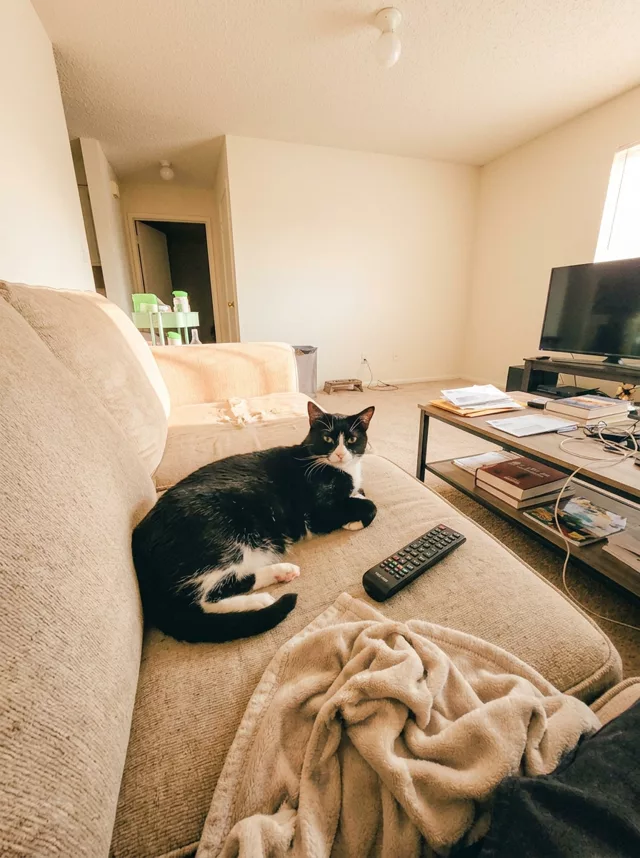
Two things are worth taking from that. The clause reduced the drift; it did not stop it. And the eyes went first — which is the single most common complaint we see about pet edits.
The More You Change, the More They Move
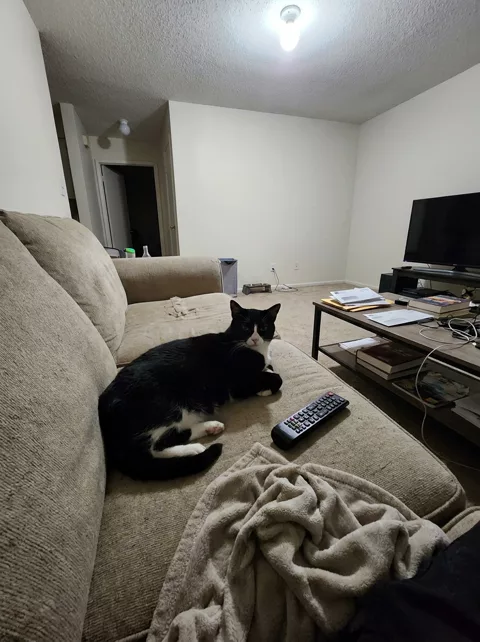
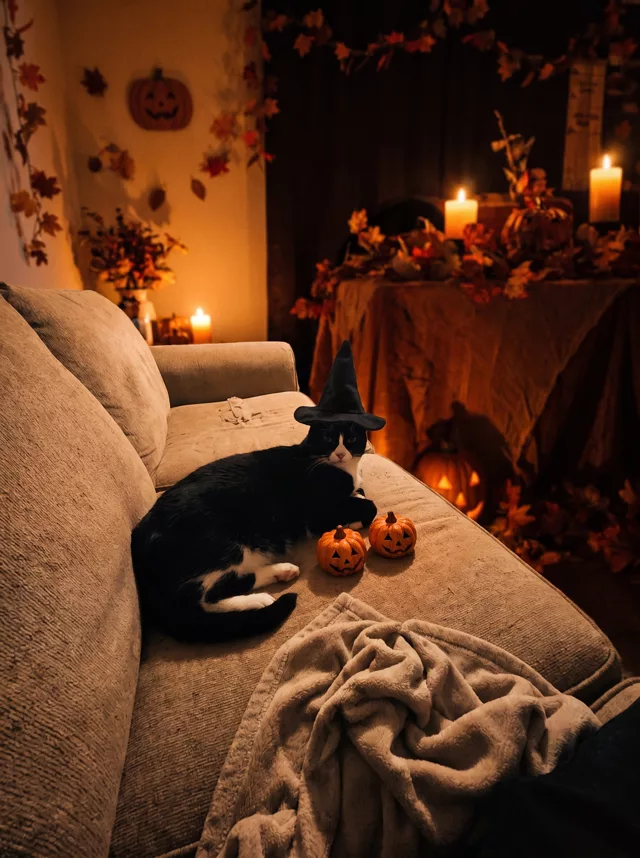
Same cat, same sofa, but a prompt that rebuilds the whole room around the animal.
Fix 1: Describe the Markings, Do Not Just Ask for Them
“Keep my pet’s markings” gives the model a rule to remember. A description gives it something to rebuild from, which is far more useful:
Keep my cat's exact markings: black body, a narrow white stripe
from the chin down the centre of the chest, white on the front
paws only, and a small white patch on the chin. The black covers
the whole top of the head and the bridge of the nose.
Do not widen or move any white area.
“Do not widen” is doing real work there. Drift toward the average tends to grow white patches rather than shrink them, so naming the direction helps.
Fix 2: Name the Eye Colour Out Loud
Eyes change before anything else, and a vague word will not hold them. “Golden-amber eyes, not green” beats “keep the eye colour”, because you are ruling out the specific thing the model reaches for.
And be honest about your source. If the photo is dim and the eyes are in shadow, there is nothing there to preserve — whatever comes back is invention, however firmly you asked. Our own example above is exactly that case.
Fix 3: The Source Does Most of the Work
A markings clause cannot recover detail that is not in the file. In the photo above the cat is a small part of a dim frame, and that is why the face moves.
Before you edit, get a photo where the animal fills a good part of the frame, the light reaches the face, and the markings you care about are actually visible. Our source photo checklist covers the rest of it. A better photo beats a better prompt here more decisively than in almost any other kind of edit.
Fix 4: Think Twice Before Naming the Breed
Saying “my tabby cat” or “my golden retriever” invites the model to reach for the average of that breed, which is precisely the pull you are fighting. Describe what is in front of you instead: “a short-haired black and white cat”, “a long-coated dog with a cream chest and darker ears”.
Name the breed only when the body shape matters — a dachshund or a pug is easier to get right with the word than without it.
Fix 5: Change Less
The pattern from the two examples holds generally: a colour-and-light edit keeps more of your pet than a scene swap. If the markings matter more than the setting, pick the prompt that leaves the room alone.
Fix 6: Repair in a Second Pass
If everything else is right, do not start over:
This image is correct except for my cat's face. Restore the
markings from the attached original photo: the white should not
extend past the chin. Make the eyes golden-amber, not green.
Change nothing else.
Attach the original alongside it if your tool takes two images. Giving the model the reference back beats describing it.
The Check Before You Post
Open the original and the result side by side and compare four things in order: eye colour, the shape and edges of every white or contrasting patch, ear markings, and whether the pattern is symmetrical in the result when it was not in life. That last one is the tell — real animals are asymmetric, and averaged ones are not.
In Our Library
Of the six pet prompts in our prompt library, five carry a markings-preservation clause — and as the first example shows, that reduces drift without eliminating it. Only two name eye colour specifically, so for the rest it is worth adding the line from Fix 2 yourself. The prompt generator has a pet subject option that carries a markings clause too, on the same terms.
FAQ
Why do the eyes change before anything else?
They are small, they are the highest-contrast thing on the animal, and they sit under a reflective wet surface that the model has to re-render. There is also less consensus in the data about what colour a given animal’s eyes should be than about, say, what colour a golden retriever’s coat is.
My dog came back with a different nose colour. Same problem?
Yes, and it responds to the same fix. Nose leather, paw pads and the inside of the ears all drift for the same reason — small areas of specific colour with no structure to anchor them. Name the colour explicitly.
Is it worse for some animals than others?
The more unusual and asymmetric the markings, the more there is to lose. A solid-coloured animal survives almost anything; a cat with a lopsided blaze or an odd-eyed dog is the hardest case, because what makes them recognisable is exactly what gets averaged away.