Underwater AI Photos: Turn Your Pet (or Yourself) Into a Summer Dive Shot
Real underwater photography is one of the hardest genres there is: waterproof housings, a pool, a pet that tolerates water, and a hundred blurry frames for one keeper. Which is exactly why the AI version keeps going viral every summer — wide eyes, trailing bubbles, sunlight rippling across the pool floor, all from a photo taken on dry land.
Two prompts cover it: one tuned for pets, one for people. They’re tuned differently on purpose — what must stay unchanged is different for each.
The pet version
Attach a clear, well-lit photo of your pet’s face and paste:
Transform this photo of my pet into a playful underwater photograph. My pet
swims just below the surface of crystal-clear sunlit water, a trail of tiny
bubbles rising past its whiskers, sunlight rippling in bright caustic
patterns across the pool floor below. Sharp focus on the face, vivid
turquoise water, sparkling refracted light. Keep my pet's exact fur colors,
markings, eye color and face completely unchanged.
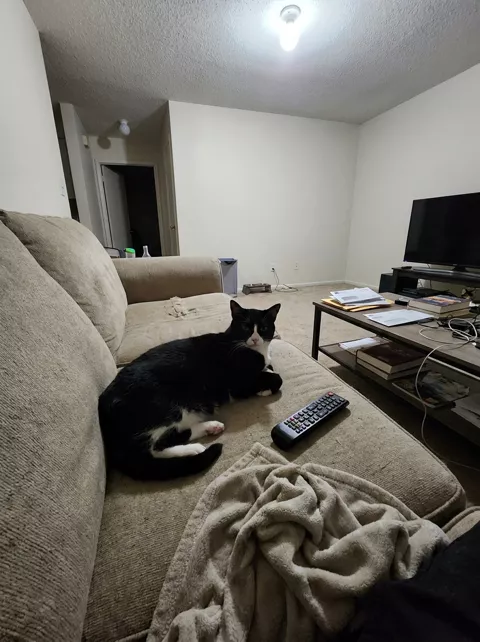
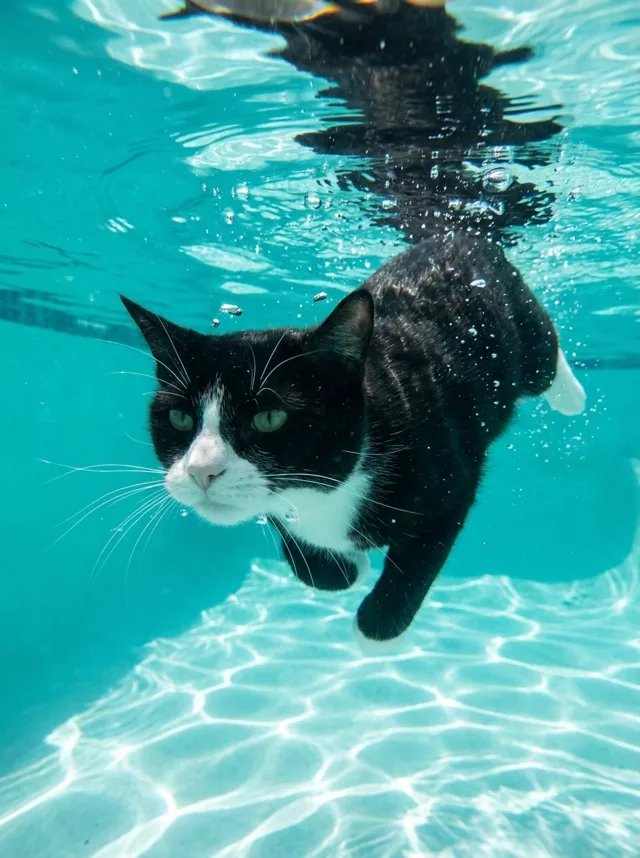
Eye color drifts most on this one — the water’s blue-green loves to bleed into the eyes. If your amber-eyed cat comes back aquamarine, add “keep the amber eyes exactly” and regenerate. Saved in the library as Underwater Pet Dive.
The people version
Transform this photo of me into a dreamy underwater summer portrait. I
float just beneath the surface of crystal-clear turquoise water, my hair
fanning out softly, sunbeams refracting down around me and tiny bubbles
catching the light. Calm serene expression, natural skin tones, bright airy
summer feel with a gentle film-like grade. Keep my exact facial features,
do not change my face in any way.
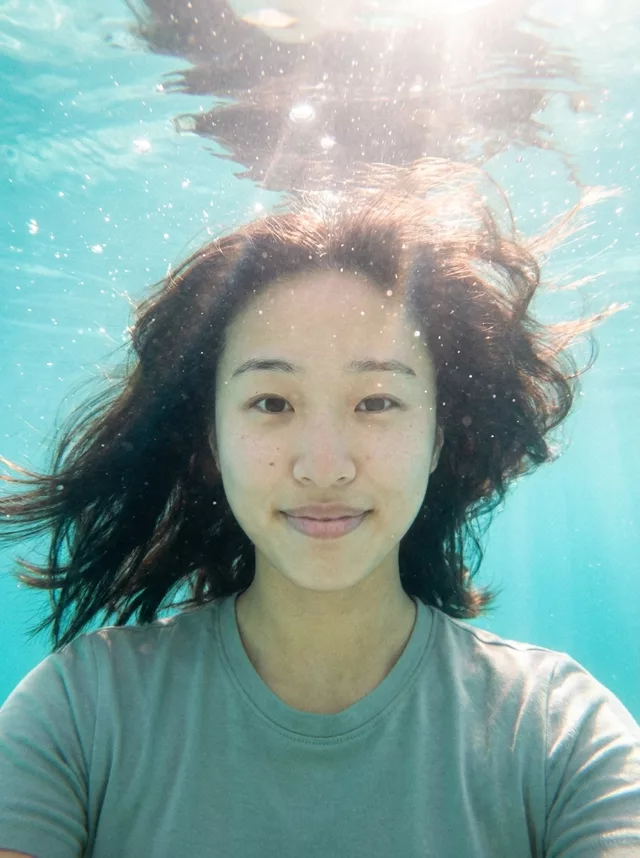
The hair fanning out is what sells it — it’s the one detail that says “actually underwater” rather than “photo with a blue filter”. Saved as Underwater Summer Portrait.
Getting a clean result
- Start from a sharp, front-lit photo. Water distortion gives the model an excuse to redraw the face; a crisp source photo keeps it honest.
- Watch the skin and fur tone. Everything shifts cool underwater. Both prompts ask for natural tones, but if the result looks blue-gray, add “keep warm natural skin tones” (or fur colors) explicitly.
- Bubbles: some, not a jacuzzi. If the result is all foam, add “only a few small bubbles”. Sparse bubbles read as elegant; dense bubbles read as chaos.
- For pets, keep the mouth closed. Open-mouthed underwater pets drift toward cartoonish. “Mouth closed, calm expression” fixes it.
As with every transform on this site: the identity clause at the end is not optional decoration. It’s the difference between your cat underwater and a cat underwater.
What went wrong in our tests
Everyday clothes read as “fell in the pool”. Our people result kept the plain cotton t-shirt from the source photo — accurate, but nobody swims in a tee. If you want it deliberate, add “wearing a simple swimsuit” or “a long dress floating around me”.
A flat blue backdrop instead of a water surface. Half of what sold our pet result was the underside of the surface above the cat, rippling and mirroring him back at himself. Without it the image reads like a blue studio wall. Add “the underside of the water surface visible above, with a soft reflection”.
An accidental swimming pool. Ours came back with tiled floor and a lane line behind the cat — perfect for a pool, wrong if you pictured the sea. For open water, swap those scene words for “open sea, sandy seabed far below, no pool edges”.
The over-under variation
If your source photo is a tight head-and-shoulders selfie, full submersion crops badly — there isn’t enough body to float. The over-under shot fixes that by putting the waterline across the frame:
Transform this photo of me into an over-under water photograph. The
waterline cuts across the middle of the frame: below it I am submerged to
the shoulders in clear turquoise water with soft light rays and a few tiny
bubbles, above it a bright summer sky and a blurred horizon. Sharp focus on
my face, natural warm skin tones, gentle film grade. Keep my exact facial
features, do not change my face in any way.
Use it when you want the image to still read as a portrait rather than an underwater scene: your face sits at or above the waterline, so likeness holds up better than in the fully submerged version. If you wear glasses, name them either way — accessories get reconstructed just like faces.
FAQ
Does this work as a video? Beautifully — take your underwater result to a Step 2 prompt and animate it: slow drift, rising bubbles. The subtle motion prompts are made for it.
My pet hates water. Is this mean? No water was involved — that’s the point. Do label it as AI-made when you post it, though; underwater pet shots are realistic enough that people genuinely ask how you did it.
Can I adjust the water color? Yes — swap “turquoise” for “deep blue lagoon” or “pale spring water”. Build variations in the generator.