Step 2 · Photo → Video
Wave From the Past
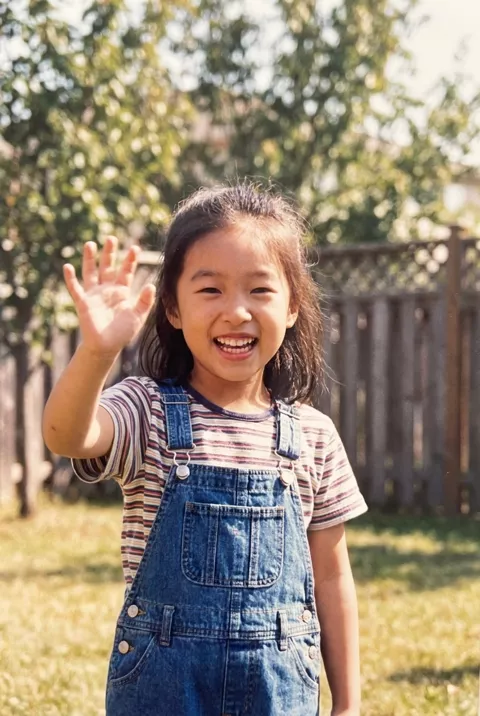
A happy little wave from an old childhood photo — simple and disarming.
The prompt
Animate this old childhood photo so the child smiles wider and waves happily at the camera. Keep the face exactly as in the photo and preserve the vintage color and grain of the original. Small natural body movement only, static camera, warm nostalgic feeling, 4 seconds.
How to use it
Only edit photos you have permission to use, including permission from the people pictured.
- Choose a restored childhood photo with a visible hand and room beside the body for a small wave.
- Upload the source to an image-to-video tool compatible with this prompt (Kling / Veo (image-to-video)), then paste the prompt. Keep the movement small and preserve the photograph’s grain and tone; remove any gesture that does not suit the people pictured. Request 4 seconds where the tool allows it; this is the requested clip length, not a generation-time estimate.
- Inspect the waving fingers and compare the child’s face throughout the clip. Remove or reduce the wave if it distorts the arm or changes the expression too much.
- Download the accepted clip and label it as AI-made when sharing. Keep the source still so you can compare later revisions.
What happened when we tested it
Check the middle of the clip, not the ends. The face held well across ours from start to finish, but the waving hand — open, centred and on screen the entire time — merged its fingers through the middle seconds and recovered by the end. First and last frames both looked fine, which is how this one slips past you. A wave is a good choice for a single clear gesture; just budget a retry, because the hand is unavoidably the centre of attention.