Step 2 · Photo → Video
Group Hug Celebration
Turn a group photo into a laughing, celebratory group-hug moment.
The prompt
Everyone in this photo laughs and pulls together into a joyful group hug. Keep every face exactly as it appears in the photo. Natural overlapping movement, genuine laughter, slight camera shake like a friend is filming, bright cheerful lighting, 5 seconds.
How to use it
Only edit photos you have permission to use, including permission from the people pictured.
- Choose a source where the people are already close together and their arms are visible, with room to lean into the hug.
- Upload the source to an image-to-video tool compatible with this prompt (Kling / Veo (image-to-video)), then paste the prompt. Keep the embrace slow and remove extra gestures if the arms overlap too much. Request 5 seconds where the tool allows it; this is the requested clip length, not a generation-time estimate.
- Watch the approach, contact, and separation. Reject a take with merged hands or changing faces; simplify the embrace before another attempt.
- Download the accepted clip and label it as AI-made when sharing. Keep the source still so you can compare later revisions.
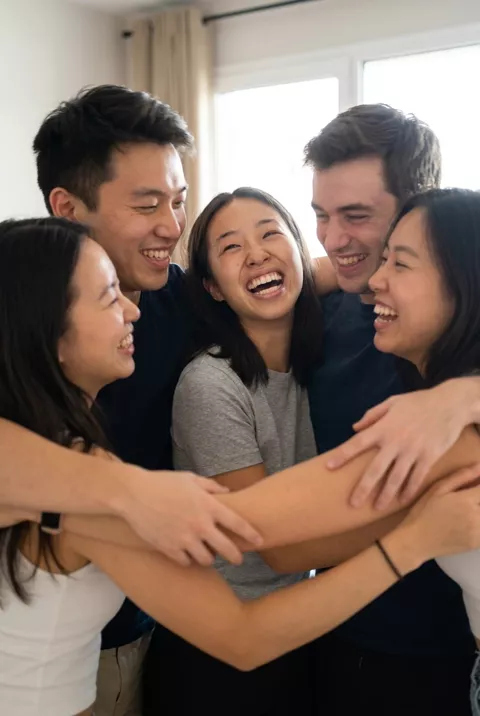
What happened when we tested it
Arms are the problem here, from the very first frame. With five people in contact, the pile of forearms across the front is already hard to read at the start — we could not trace the arm wearing a watch back to a shoulder in any frame we checked — and it stays that way to the end. The central face held throughout; the two people at the back end up half-hidden behind the heads in front. If the video matters, use three people and ask for motion without contact.