Step 1 · Photo → Aesthetic
Pet & Me Studio Shoot
A studio-quality portrait of you and your pet — markings kept true, no studio needed.
The prompt
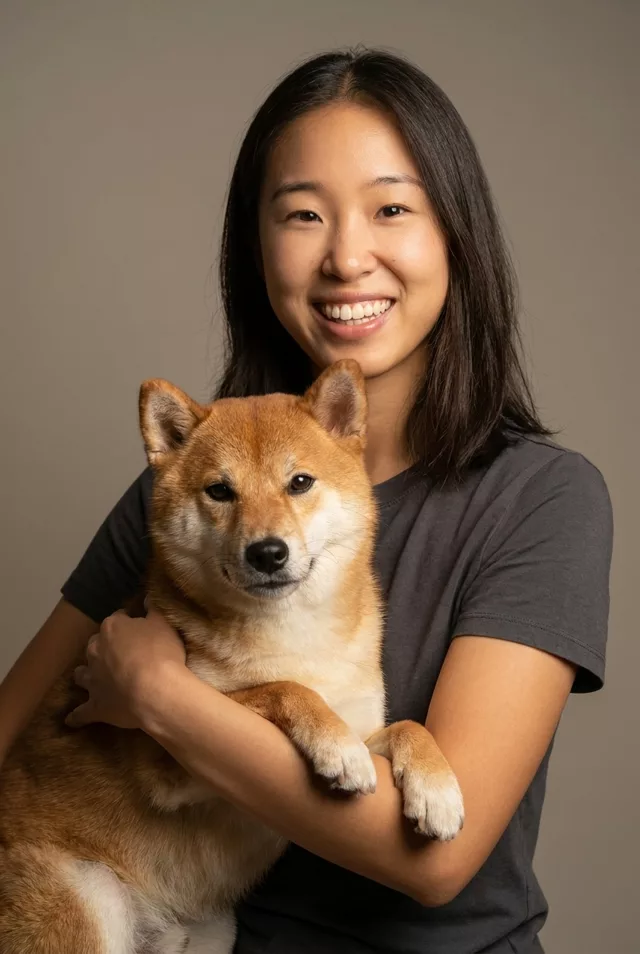
Turn this photo of me and my pet into a professional studio portrait. Keep my exact facial features and my pet's exact markings and colors unchanged. Clean warm-gray studio background, soft key lighting, both of us looking at the camera, gentle happy expressions, crisp focus, styled like a premium pet photography session.
How to use it
Only edit photos you have permission to use, including permission from the people pictured.
- Choose a source that clearly shows both your face and your pet’s distinctive markings.
- Attach the source in an AI image editor compatible with this prompt (Gemini · ChatGPT (any AI image editor)), then paste the prompt. Adjust the studio lighting and backdrop while retaining both the facial-feature and pet-marking instructions.
- Compare your face and the pet’s fur colors and markings separately. Inspect the hands, paws, and the space between you.
- Save the accepted image separately from the original and label it as AI-edited when sharing. Use the saved edit as the source if you choose to animate it next.
What happened when we tested it
Holding a pet means a hand on the pet, and that hand is where ours failed — the fingers curled into a smooth mass you cannot count. Either ask for your arm around the pet with the hand out of frame, or sit side by side instead of holding. The rest is strong: both of you looking at the camera, a clean studio backdrop, and the markings held, white paw tips included.