Step 2 · Photo → Video
Figurine Orbit Showcase
Turn your AI figurine photo into a rotating product showcase — the camera orbits while the figure stays perfectly still.
The prompt
Animate this figurine scene: the camera slowly orbits halfway around the figurine on its base, revealing the diorama details behind and beside it. Warm light glints off the glossy figure as the camera moves. The figurine stays perfectly still like a real collectible. Keep the face exactly as in the photo. Cozy warm lighting, shallow depth of field, 5 seconds.
How to use it
Only edit photos you have permission to use, including permission from the people pictured.
- Choose an image with the full figurine, its base, and some surrounding space visible.
- Upload the source to an image-to-video tool compatible with this prompt (Kling / Veo (image-to-video)), then paste the prompt. Keep the camera orbit and the instruction that the figurine stays still; reduce the orbit angle if the unseen side is being invented. Request 5 seconds where the tool allows it; this is the requested clip length, not a generation-time estimate.
- Check that the camera moves rather than the figure rotating itself. Compare the face, base, and diorama details across the whole orbit.
- Download the accepted clip and label it as AI-made when sharing. Keep the source still so you can compare later revisions.
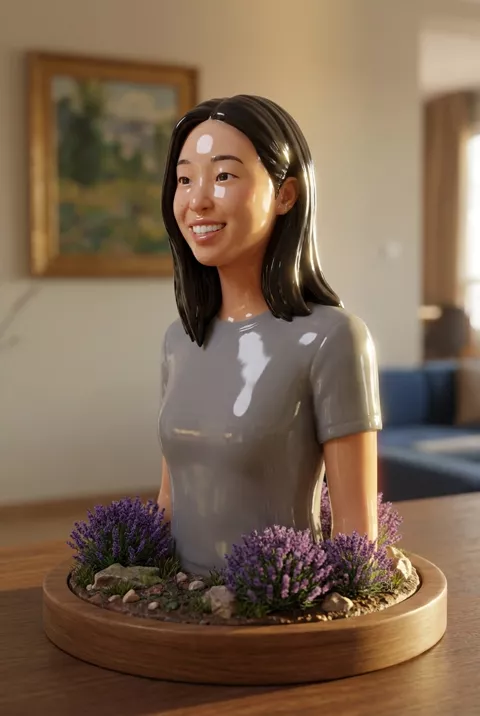
What happened when we tested it
Read this one against our orbit reveal, because the camera move is identical and the outcome is not. There the person turns with the camera; here the figurine is required to stay perfectly still, so every new angle of the face has to be invented — and ours is arguably a different sculpt by the profile at the end. Accept a looser likeness, or shorten it to a quarter turn. The glossy sheen and the diorama parallax are genuinely good.